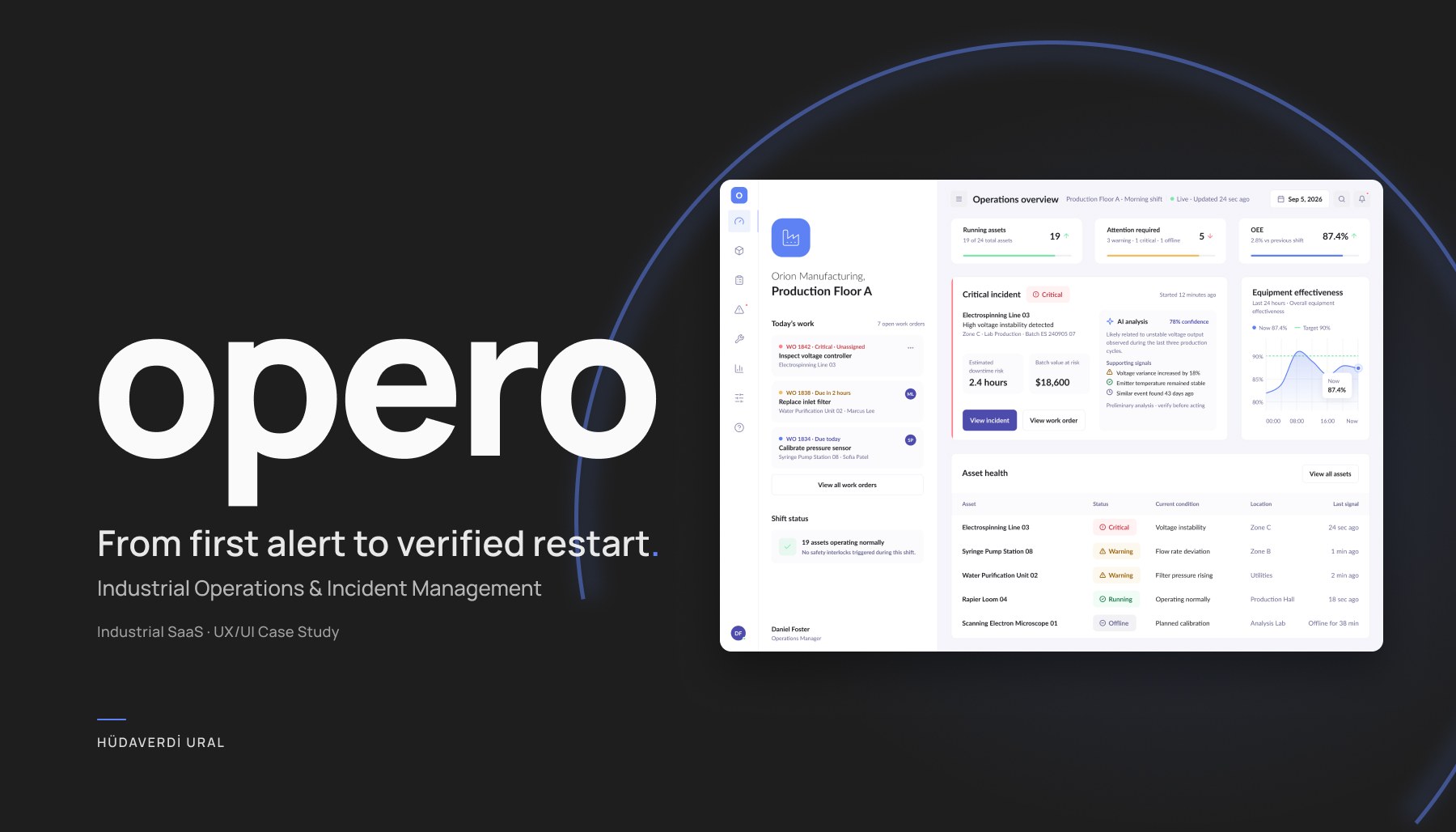
Industrial Operations SaaS

Opera

One connected workflow from critical incident to safe production restart

Opera connects operations managers and maintenance technicians through one continuous workflow. It turns live machine data into clear incident context and supports the process from investigation to a controlled production restart.

Role
Product Designer
Scope
UX Strategy, Product Design, UI Design
Platform
Desktop SaaS, Mobile App
Year
2026
Opera operations platform shown on a desktop screen
Project

Operational data needs context before it becomes actionable

Spotting an alert is only the beginning. Teams also need to understand what changed, how production is affected, who is qualified to respond and when the equipment can safely return to service. Opera brings those decisions into one traceable workflow.

Understand the incident

Read live signals, production impact and incident history together.

Coordinate the response

Assign maintenance work using qualification, certification, location and availability.

Return safely

Keep maintenance, safety verification and restart approval in one accountable record.

Two roles, one operation

Operations manager

Focuses on production impact, response priority and visibility across the full incident lifecycle.

Maintenance technician

Needs clear machine context, safety requirements and practical guidance for work on the floor.

Product flow

Keeping context intact from alert to resolution

01

A clear view of the production floor

The operations overview brings asset health, equipment effectiveness, open work and the most urgent incident into one hierarchy. The critical issue is visible without turning the entire dashboard into an alarm state.
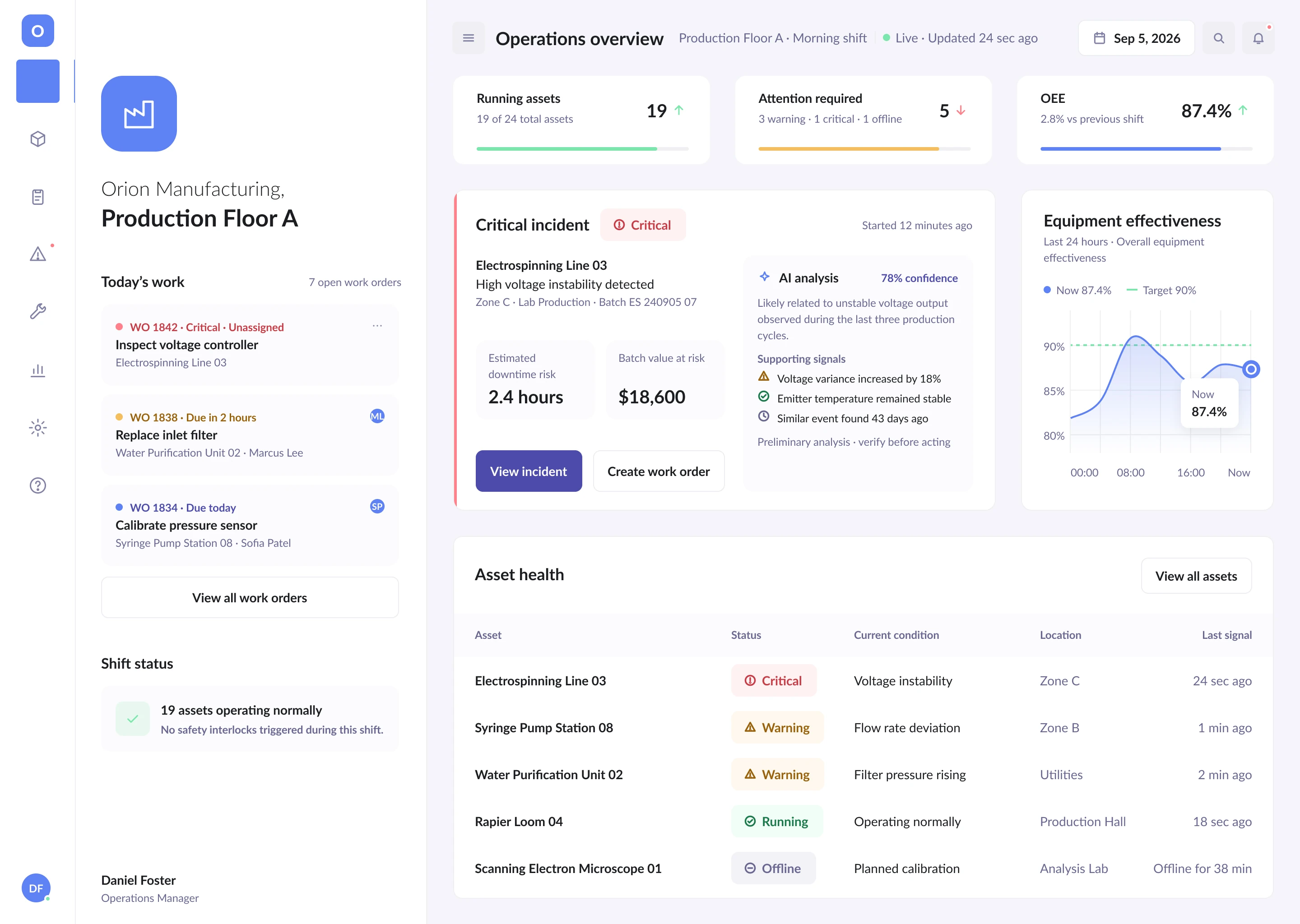
Opera operations overview with asset health, today's work and the active critical incident
Asset health, open work orders and the active incident in a single hierarchy
02

An incident view built around evidence

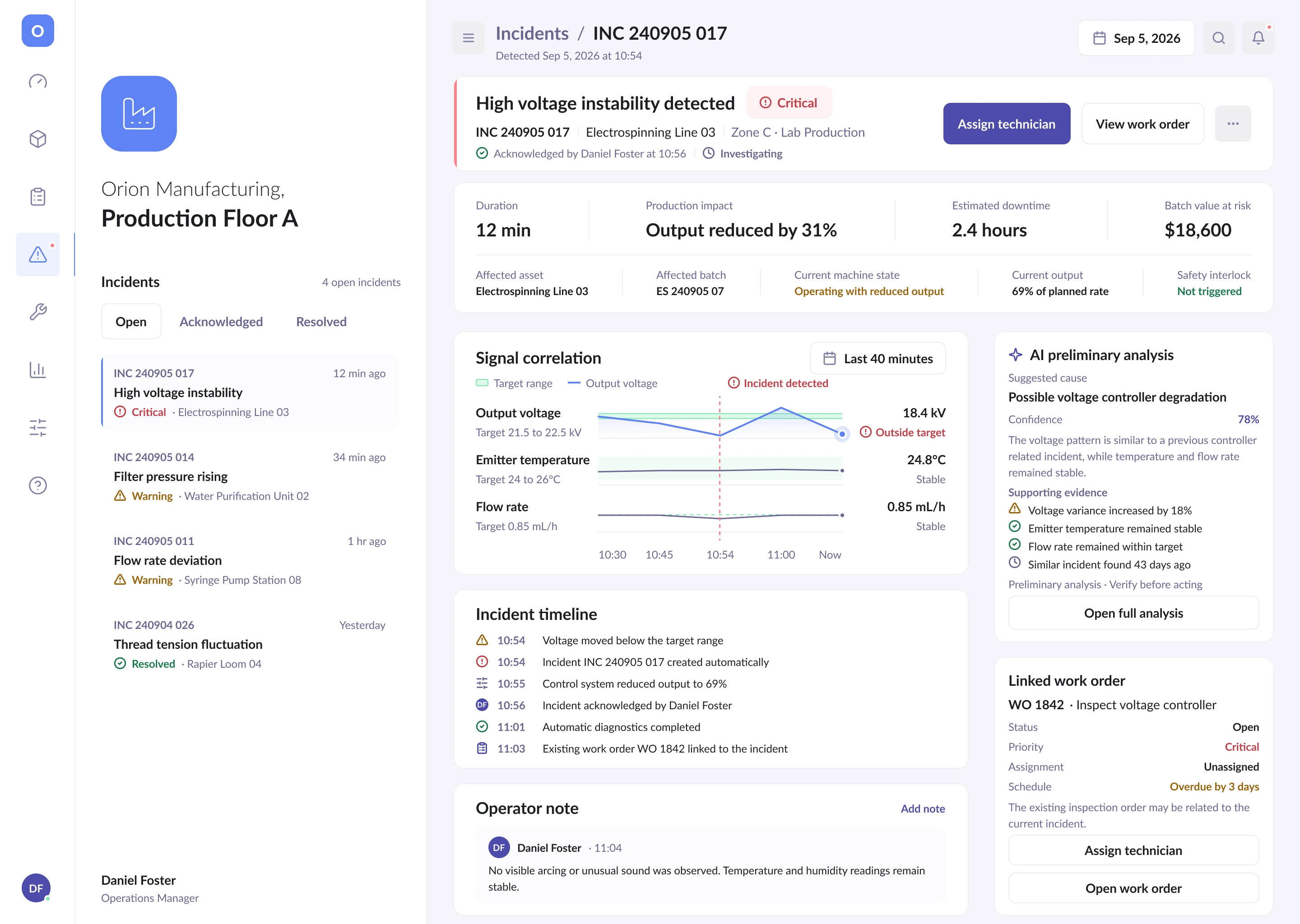
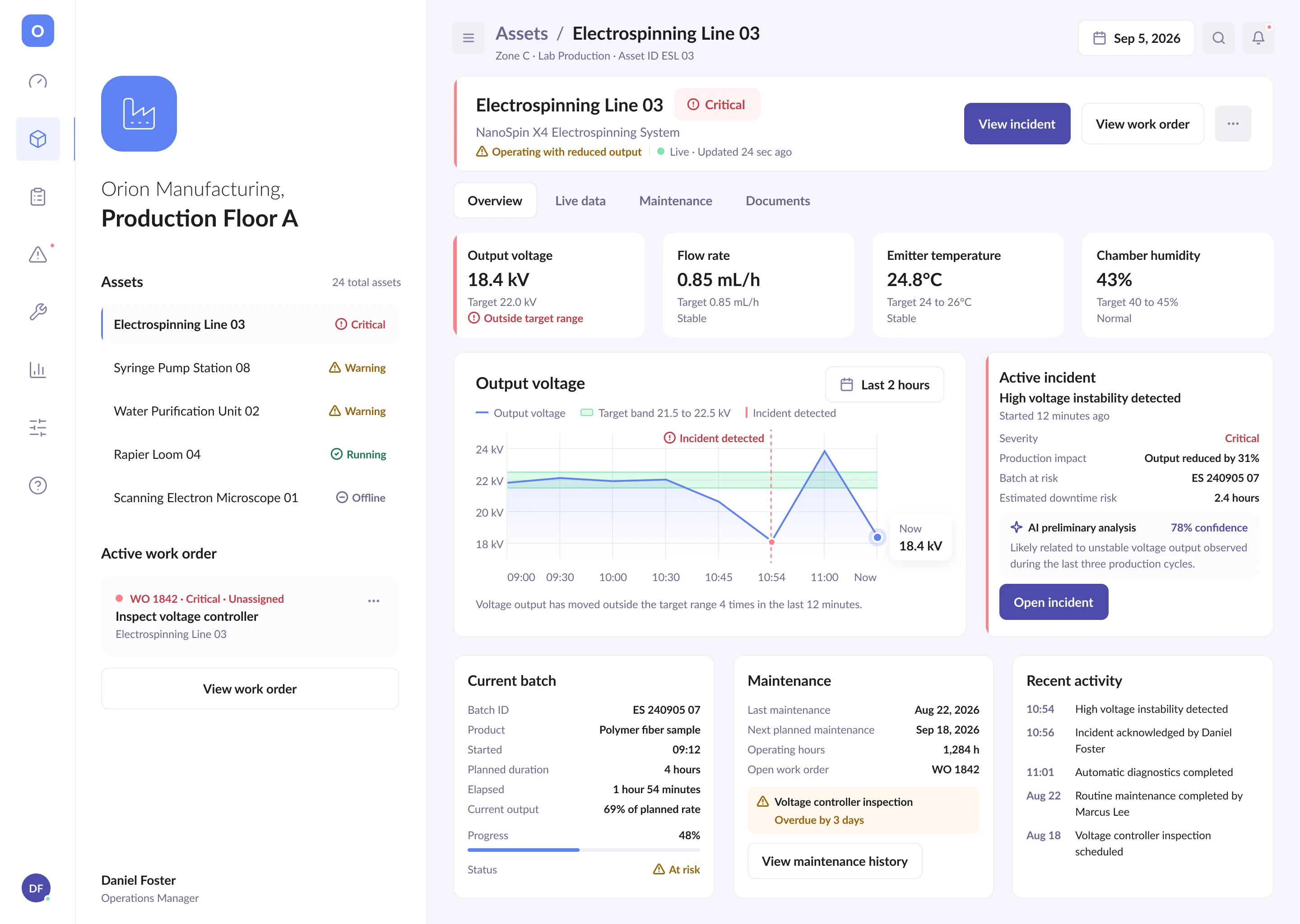
Machine and incident views do more than flag a voltage problem. They connect the target range, related sensors, production impact, prior events and a shared timeline so the team can understand what happened and what the system knows.

Opera machine detail showing the target voltage range, related sensors and recent behaviour
Machine detail with the target range, related sensors and recent behaviour
Opera incident detail showing production impact, prior events and the incident timeline
Incident detail with production impact, earlier events and a shared timeline
03

AI that supports judgement instead of replacing it

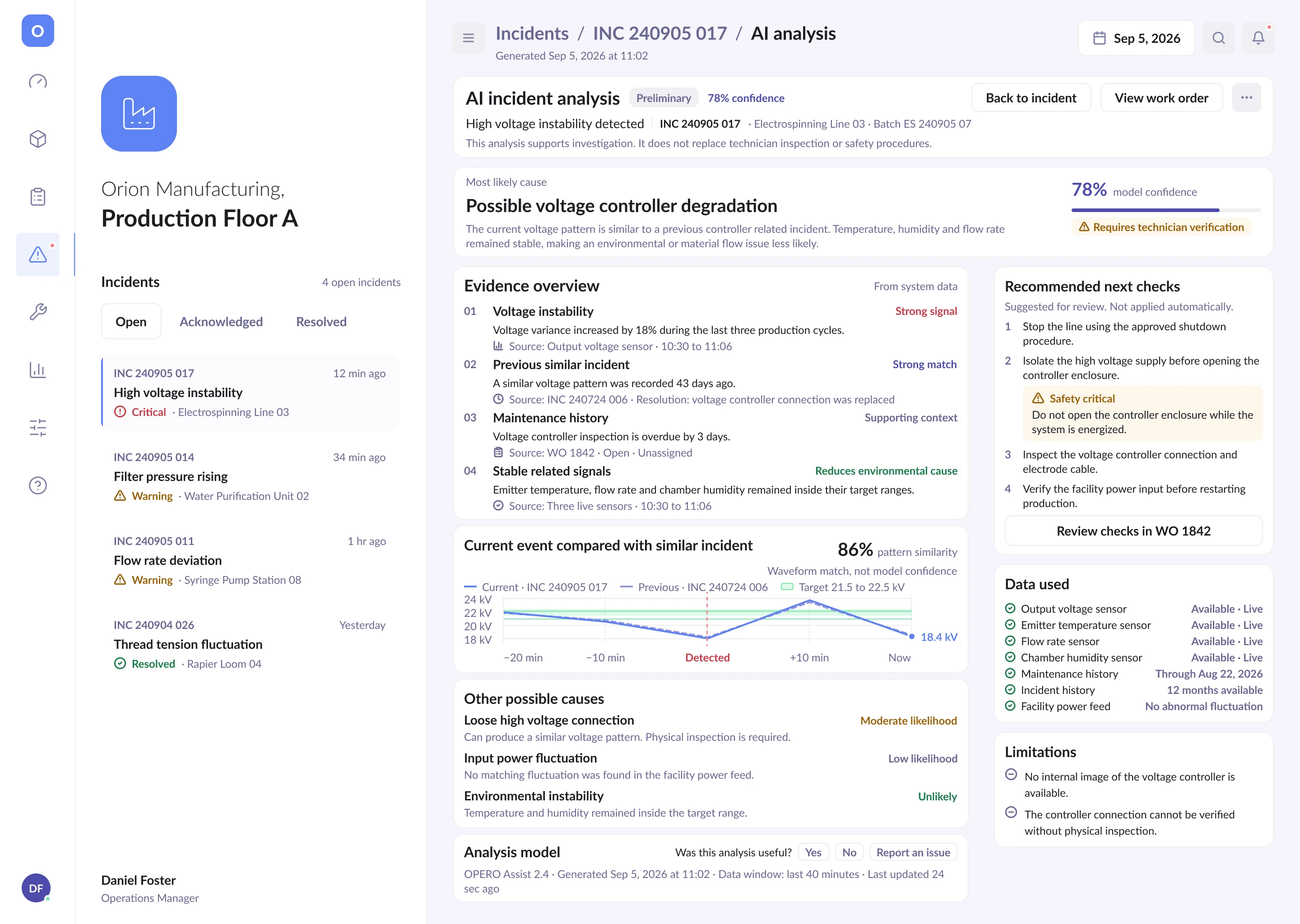
The analysis presents a likely cause with 78 percent confidence and exposes the evidence behind it. Pattern similarity is kept separate from model confidence, while alternative causes, limitations and technician verification remain visible.

Opera incident analysis showing confidence level, supporting evidence, alternative causes and limitations
Confidence, supporting evidence, alternative causes and stated limitations side by side
  • Confidence stays visible
  • Evidence keeps its source
  • The final decision stays human
04

Turning analysis into accountable work

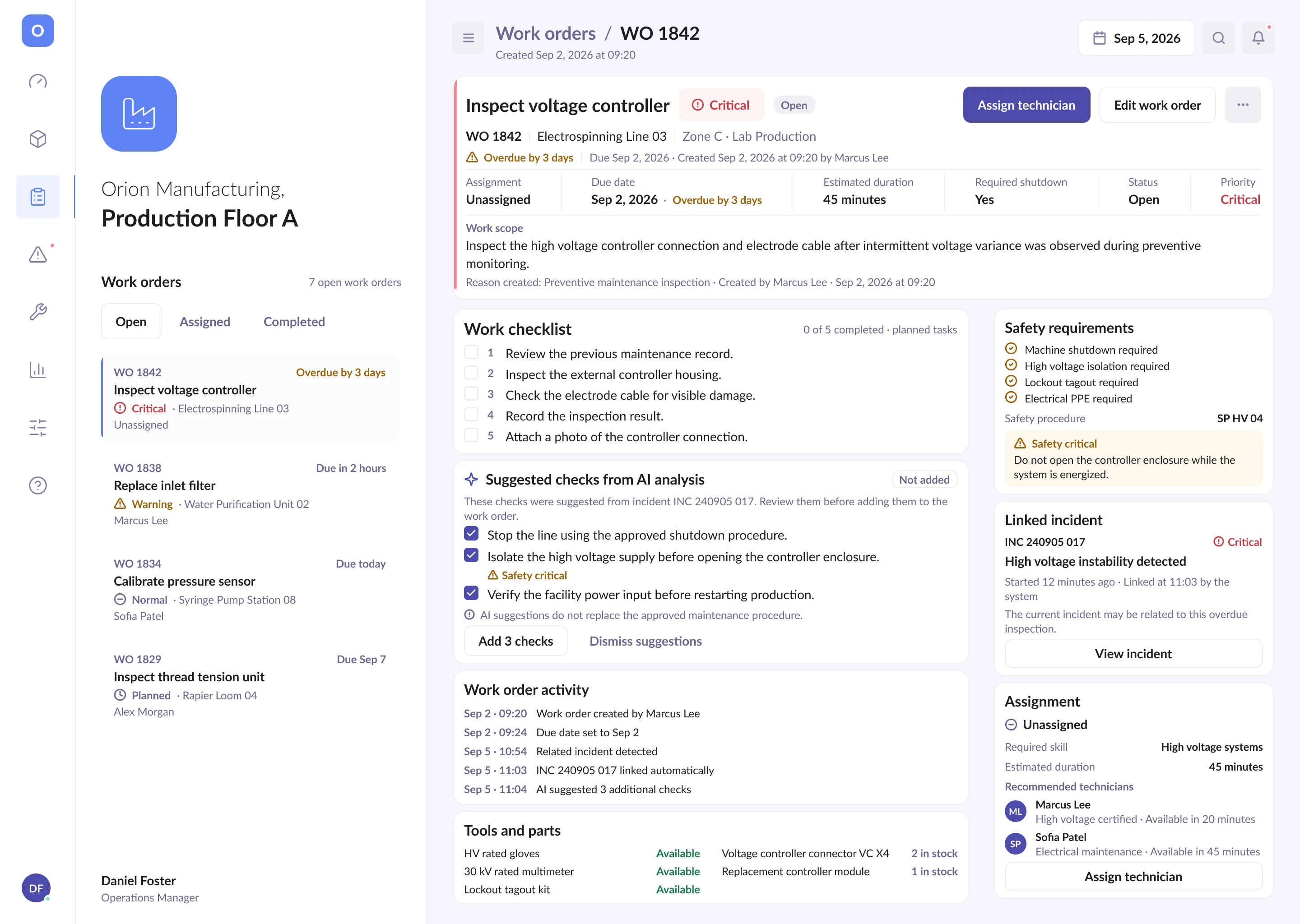
The incident connects to an existing work order where planned tasks, suggested checks, tools and safety requirements can be reviewed together. AI suggestions remain pending until a person chooses to add them.

Opera work order detail with planned tasks, suggested checks, tools and safety requirements
Planned tasks, suggested checks, tools and safety requirements in one place
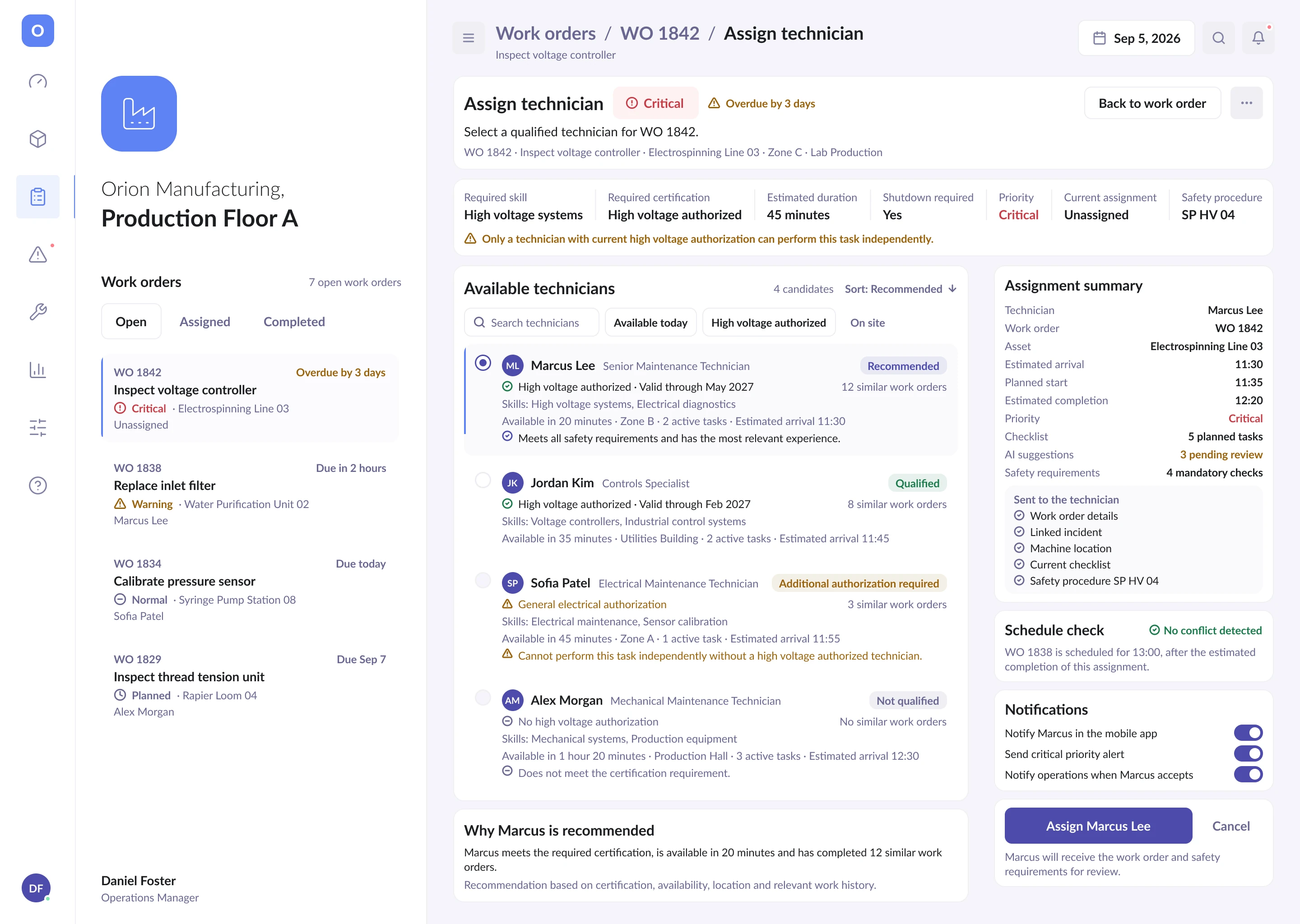
Opera technician assignment comparing certification, experience, location and workload
Assignment weighed on certification, experience, location and current workload

The recommendation considers certification, relevant experience, location, workload and estimated arrival time.

05

A focused mobile experience for work on the floor

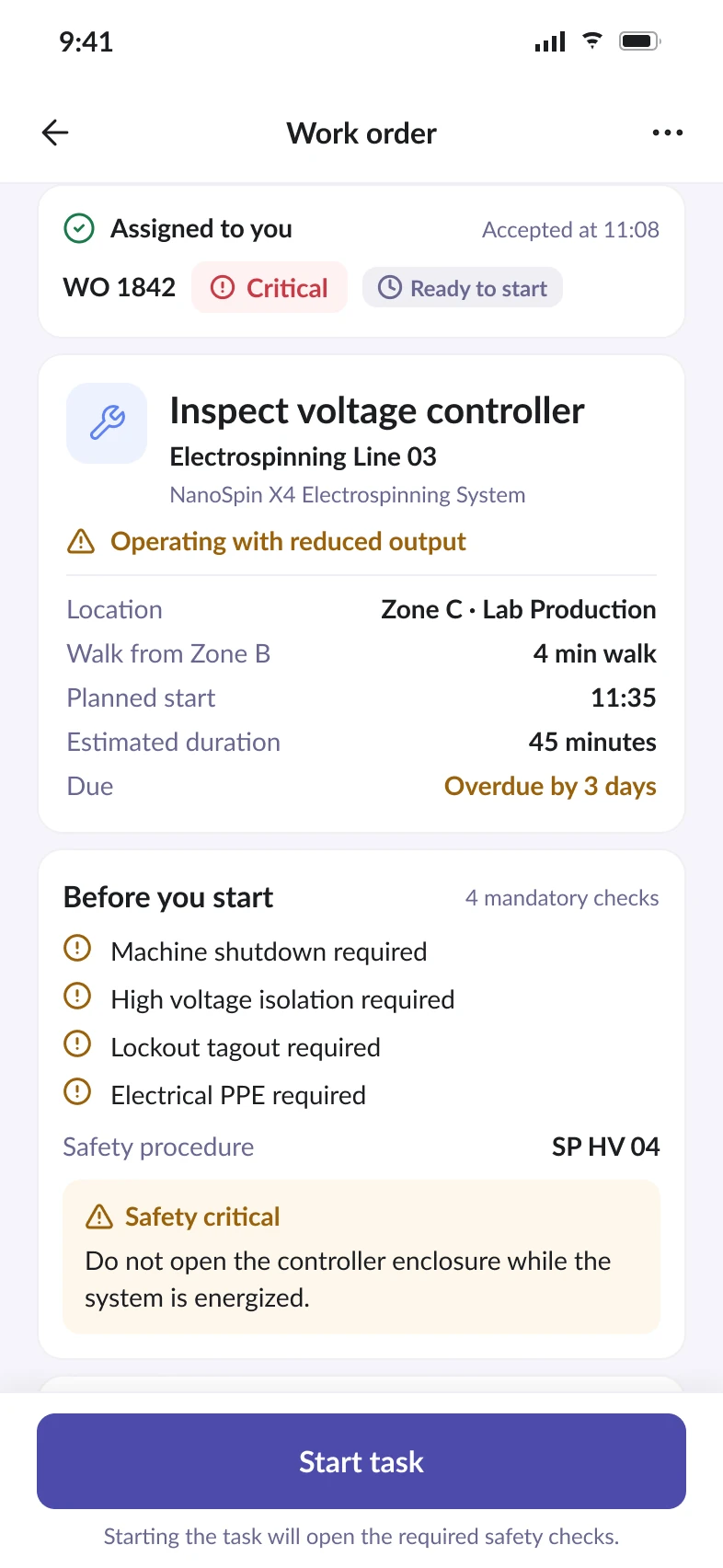
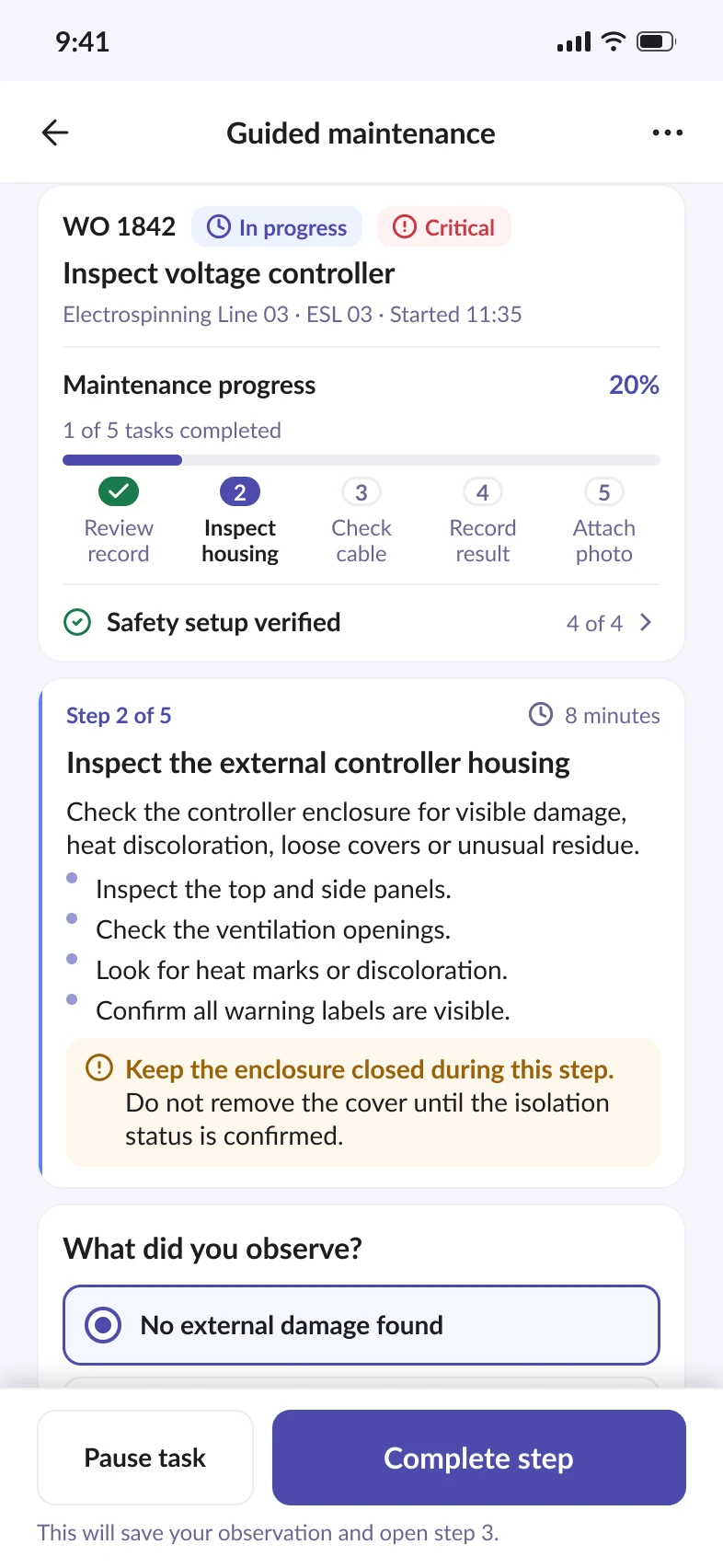
The mobile experience is not a compressed desktop dashboard. Before work begins, the technician sees task context and mandatory safety checks. During maintenance, the interface focuses on the current step, observation, evidence and progress.

Opera mobile work order screen showing task context and four mandatory safety checks
Task context and mandatory checks before work starts
Opera guided maintenance screen showing the current step, progress and an observation field
The current step, the observation being recorded and overall progress
06

Finishing maintenance is not the same as restarting safely

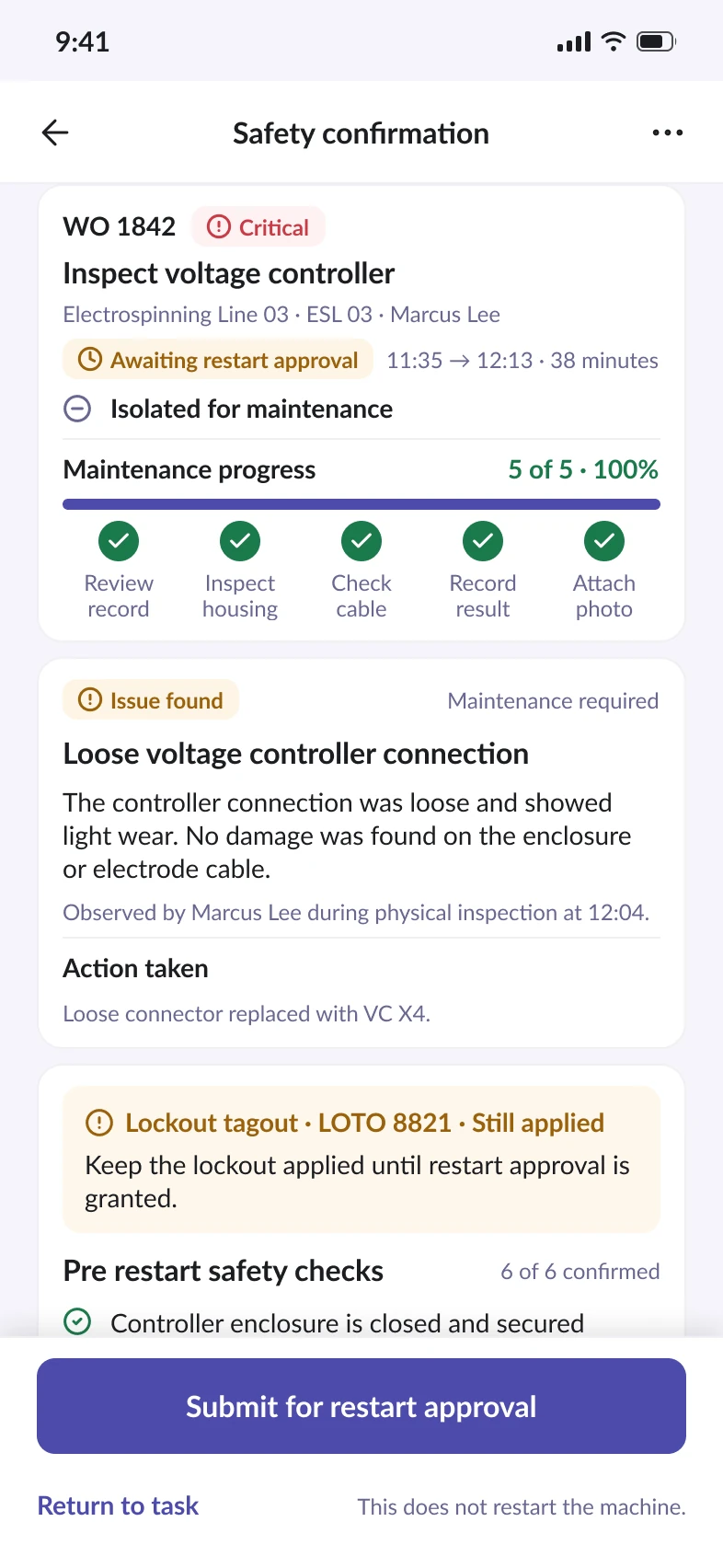
Completing the maintenance steps does not restart the machine. The technician records the finding, work performed, verification readings and safety checks. Lockout remains in place until restart approval is granted.

Opera safety confirmation screen with verification readings and the lockout still applied
Lockout stays applied until restart approval is granted

A resolution record that preserves what the team learned

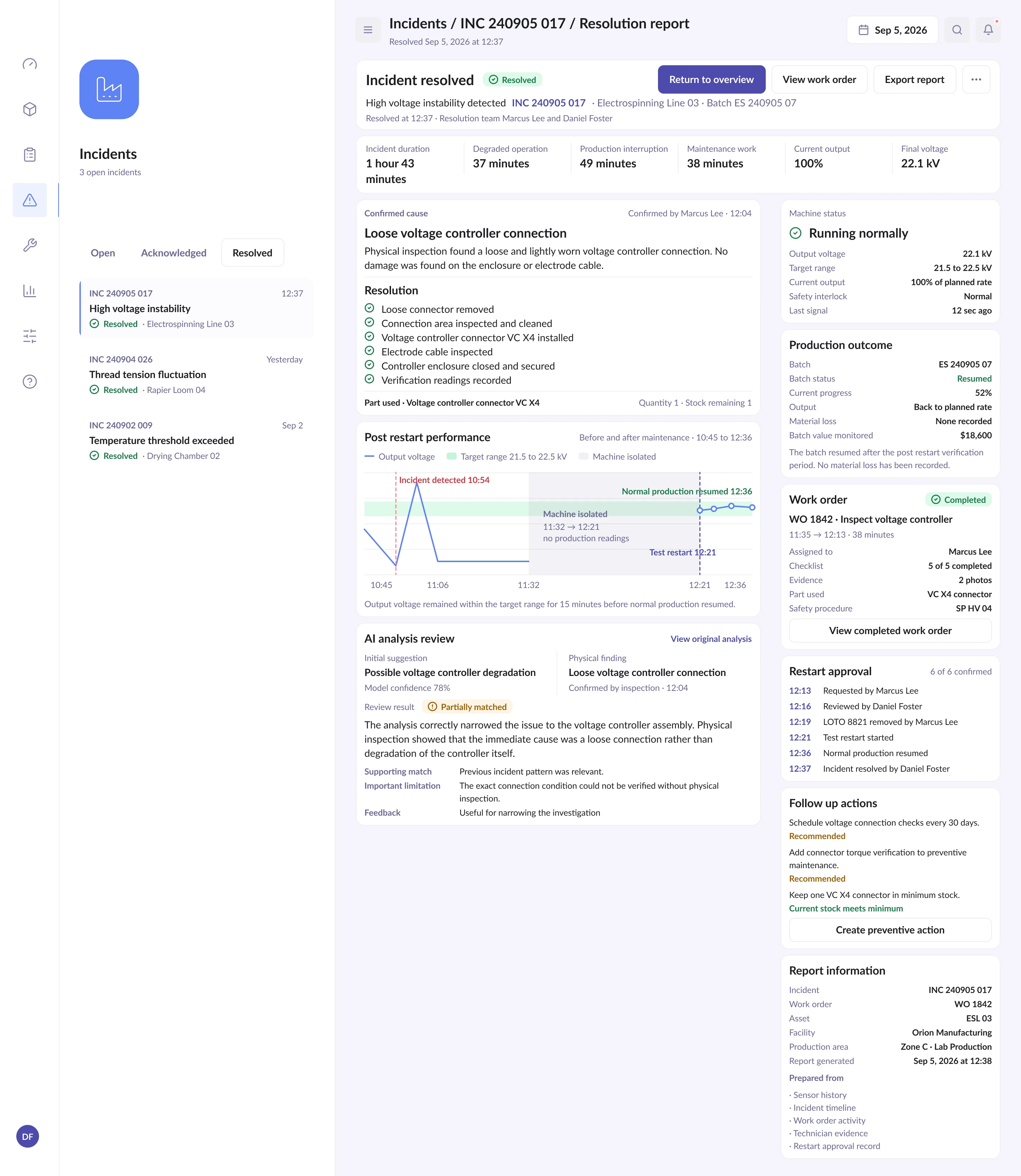
The resolution report connects the original incident, the confirmed physical cause, completed maintenance and the controlled production restart. It also preserves the difference between the initial AI suggestion and the technician's finding.

Opera resolution report linking the incident, the confirmed cause, the maintenance performed and the production restart
One record holding the incident, the confirmed cause, the work performed and the restart

Decisions that shaped the product

Context across handoffs

Assets, incidents, work orders and reports stay connected through consistent records.

Explainable AI

Every suggestion includes confidence, sources, alternatives and limitations.

Clear safety boundaries

Starting work, completing maintenance, requesting approval and restarting equipment remain separate actions.

Density shaped by role

Desktop views support comparison and coordination, while mobile screens focus on the task at hand.

A calm interface for high stakes decisions

Opera uses light surfaces, restrained borders and a controlled status palette. Red is reserved for critical conditions, amber signals attention and green marks verified states. Separating visual accent from interactive color keeps charts recognizable while improving contrast in smaller text and controls.

Typography
Lato
Visual accent
#29b6f6
Interactive primary
#29b6f6
Surface
#FFFFFF
Background
#F5F5FA
Reflection

A product system built around connected decisions

Opera was designed as more than an operations dashboard. The core challenge was to connect investigation, work coordination, field execution, safety approval and reporting without losing context between roles. Desktop and mobile experiences support the same process while giving each user the level of detail their work requires.

What I would explore next

Next, I would explore shift handovers, preventive maintenance planning and cross facility operations.